![Husl_logo_strapline-TM (4).png]](https://help.husl.io/hs-fs/hubfs/Husl_logo_strapline-TM%20(4).png?height=40&name=Husl_logo_strapline-TM%20(4).png)
Yes, HUSL now allows you to complete and record transactions made through external card processors and other custom offline payment methods such as gift vouchers, memberships and external card systems etc.
⚠️ Please continue reading - there’s an important notice regarding “Open” carts and how they are removed after 7 days.
Make sure your app is updated to the latest version to access this feature.
Why Use Our Embedded Stripe Integration?While Offline Payment Types give you flexibility to record external transactions - using HUSL’s built-in Stripe integration provides a more powerful and seamless experience.
With embedded Stripe, you can:
- Take single, unified payments for services and drop shipped products in one transaction
- Enable automatic deposits and cancellation policies for online bookings
- Reduce manual entry and reconciliation between systems
- Provide a smoother checkout experience for clients
- Keep all payments, reporting, and tracking fully centralised in HUSL
👉 If you sell your services/in stock retail and drop-shipped products in one transaction - Stripe integration is required to support combined payments in a single checkout or the dropshipped product in that one checkout.
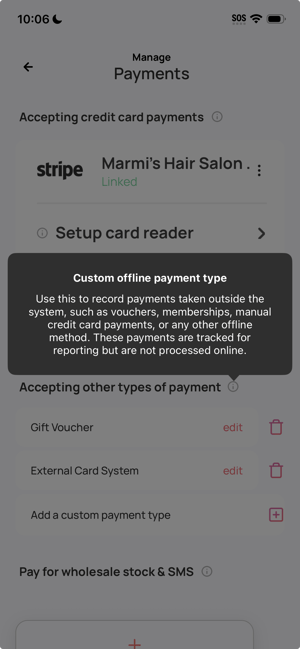
What Are Custom Offline Payment Types?Offline Payment Types let you record and complete payments made outside of HUSL’s built-in card processing system (Stripe).
You can now:
- Add custom payment types (e.g. External Card Processor, Gift Vouchers, Memberships, Salon Pay)
- Split a single transaction across multiple payment methods
- Track all payments accurately in your reports
These payments will correctly appear on:
- Receipts
- Customer records
- Sales reports (broken down by payment type)
You can add up to 3 custom offline payment types.
How to Set Up Custom Offline Payment TypesFrom the Home Screen:
- Tap your Profile Image (top left)
- Go to Payments
- Tap Offline Payment Types
- Add and customise your payment methods
Before using external card processing or offline payment methods, please note:
- No combined checkout for services + drop shipped products
If you are using an external card processor, you will not be able to take a single combined payment for both services and drop shipped products. To enable this, you must use HUSL’s embedded Stripe integration. - Deposits and cancellations require Stripe
HUSL’s integrated deposit and cancellation system is only available when using Stripe. It cannot be used with external card processors or offline payment methods.
⚠️ Important: Completing Transactions
Now that Offline Payment Types are available, it’s important to always complete transactions at checkout.
If a transaction is left “Open”, it will be automatically removed after 7 days.
You can always reopen them by tapping on the booking in your calendar.
(Pending / Overdue Carts will not be affected.)
💡 Tips- Set up your most commonly used external payment methods first (e.g. EFTPOS, gift cards)
- Use split payments when clients pay using multiple methods
- Always ensure transactions are marked as completed before closing your day
Need help? email: indiesupport@husl.io