![Husl_logo_strapline-TM (4).png]](https://help.husl.io/hs-fs/hubfs/Husl_logo_strapline-TM%20(4).png?width=120&height=40&name=Husl_logo_strapline-TM%20(4).png)
Your working hours don't always follow the same pattern every week. You might work different hours every second week, have a different schedule every third or fourth week, or change your availability every couple of months.
HUSL gives you the flexibility to set these different working patterns in your availability, so you don't have to manually change your hours every time your schedule changes.
How to set different working hours- Go to Booking Setup.
- Tap your Location.
- Go to Availability.
- Find the day you want to change.
- On the right-hand side of the day, tap Weekly.
- Choose the occurrence you want to set your hours for.
- Select when you want those working hours to start and end.
- Repeat for any other working days you need.
- Tap Save.
You can use this to create a working-hour pattern that suits your individual schedule.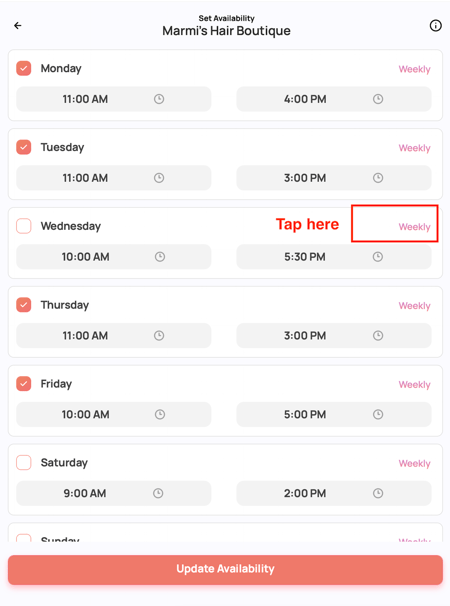
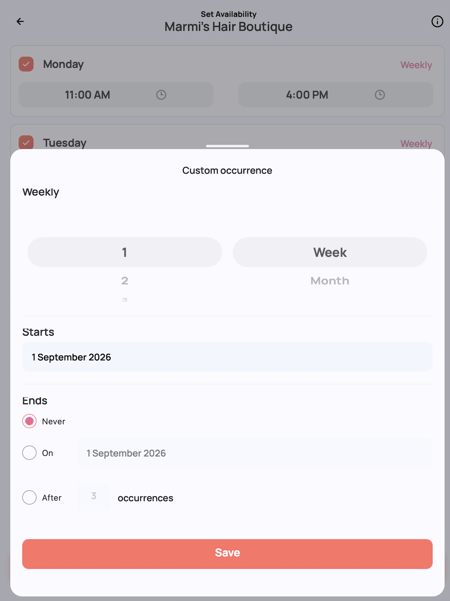
Why is this useful?
This is particularly helpful if your working schedule isn't the same every week.
Rather than constantly changing your availability manually, you can set your working-hour occurrences in advance so your HUSL Online Booking availability reflects when you're actually available.
💡 Tip
Take a few minutes to set your recurring availability correctly when you first set up your booking hours. This can save you time later and helps prevent clients from requesting appointments when you're not working.
Your availability should always reflect your actual working schedule, particularly if you have a recurring pattern that changes from week to week.
Need help? email: indiesupport@husl.io