![Husl_logo_strapline-TM (4).png]](https://help.husl.io/hs-fs/hubfs/Husl_logo_strapline-TM%20(4).png?width=120&height=40&name=Husl_logo_strapline-TM%20(4).png)
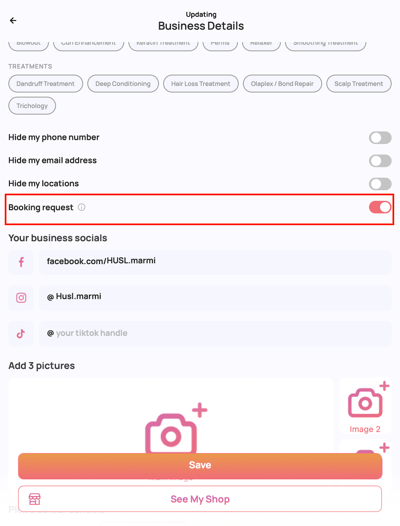
You have two options:
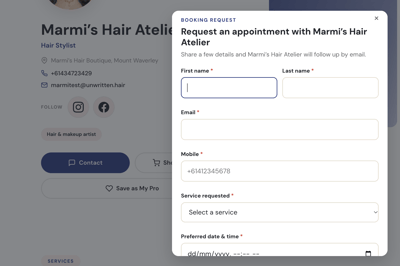
- Booking Request ON: Customers can submit a 'booking request' by selecting a service and their preferred date and time.
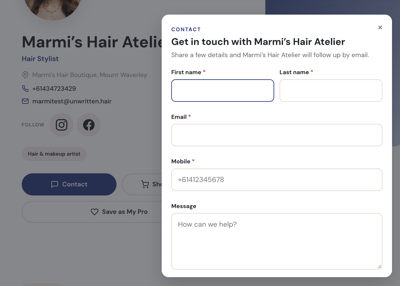
- Booking Request OFF: Customers will see a 'general contact' form where they can enter their first name, last name, email address, mobile number and a message.
How to change your contact form setting
- Open your HUSL app.
- From the home screen, tap your profile image in the top-left corner.
- Tap Business Details.
- Find the Booking Requests toggle.
- Switch it ON or OFF, depending on which form you'd like customers to see.
This setting determines which form appears when someone taps the Contact button on your HUSL Beauty stylist page.
What happens if I turn Online Booking on?
When Online Booking is switched on in Booking Setup, customers will see a Book Now button on your HUSL Beauty stylist page instead of the Contact button.
In this case, the Booking Requests setting in Business Details is unavailable because customers can book directly through your online booking system.
Need help? email: indiesupport@husl.io