![Husl_logo_strapline-TM (4).png]](https://help.husl.io/hs-fs/hubfs/Husl_logo_strapline-TM%20(4).png?width=120&height=40&name=Husl_logo_strapline-TM%20(4).png)
How do clients submit a review?
After you complete a transaction in HUSL, your client will receive an SMS and/or email 24 hours later inviting them to leave a review.
Once a client submits a review, you'll receive an app notification letting you know it's ready for you to review.
How do I publish a client review?
- Tap the app notification to open your My Reviews Dashboard.
- Review the feedback your client has submitted.
- Choose what you'd like to do with the review:
- Publish with a comment: Add your own comment before publishing.
- Publish without a comment: Publish the review as it is.
- Unpublish: Keep the review unpublished.
Once published, the review will appear on your HUSL Beauty stylist page, helping potential clients learn more about the experience you provide.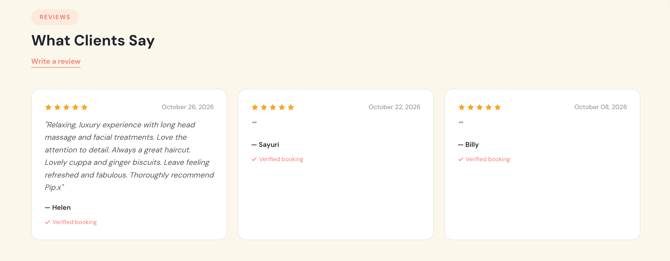
What if I miss the notification?
No worries! You can access your Client Reviews Dashboard at any time from the HUSL app.
- From the home screen, tap your profile image in the top-left corner.
- Tap My Reviews.
Here, you can view and manage your client reviews, even if you've missed the original notification.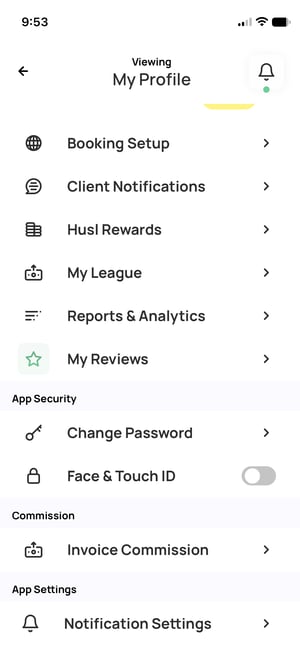
Tip: Client reviews help potential clients feel more confident about booking with you. Encourage happy clients to share their experience and keep an eye on your reviews so you can publish feedback to your HUSL Beauty page.
Need help? Email: indiesupport@husl.io